
Download ThatNeedle – AI‑Powered YouTube Summarizer, Free Browser Extension
Overview
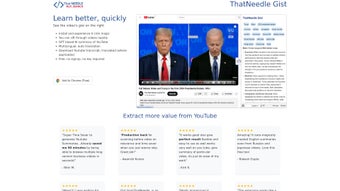
In an era where video content dominates the internet, spending hours scrolling through YouTube to find the exact information you need can feel overwhelming. ThatNeedle (also known as ThatNeedle Gist) is an efficient AI summarizer for YouTube videos that transforms this chaotic experience into a streamlined, time‑saving workflow. Powered by a GPT‑based language model, the extension instantly extracts the core ideas, main arguments, and key take‑aways from any YouTube video and presents them as a concise, readable summary. Whether you are a student reviewing lecture recordings, a developer hunting for a quick tutorial, or a casual viewer deciding if a video is worth watching, ThatNeedle puts the essential information at your fingertips within seconds.
Beyond summarization, the tool offers automatic translation, turning foreign‑language transcripts into English (or other supported languages) without the need for separate subtitle files. This multilingual capability makes the extension especially valuable for global audiences that consume content in Russian, Japanese, and many other languages. The product is distributed as a free browser extension for Chrome, Edge, and Firefox, requiring no sign‑ups, API keys, or hidden fees. Its lightweight design ensures a secure, privacy‑first experience—your browsing data stays on your device, and the AI processing occurs in the cloud without storing personal identifiers.
ThatNeedle’s mission is simple: let users decide the relevance of a video in a fraction of the time it would normally take to watch it. By providing instant summaries, it empowers knowledge‑workers to allocate their attention more wisely, boost productivity, and stay ahead in fast‑moving fields. Below we dive into the most compelling features, walk through the installation process, and examine the compatibility and performance considerations that make ThatNeedle a must‑have tool for any frequent YouTube user.
Key Features
- Instant AI‑Generated Summaries – The GPT engine analyses video audio, captions, and on‑screen text to create a clear, 150‑word summary that captures the main points.
- Multilingual Translation – Automatic transcript translation from Russian, Japanese, Spanish, and more into English (or other target languages) with a single click.
- One‑Click Relevance Check – Quickly decide whether a video is worth watching by glancing at the summary before you invest time.
- Free Browser Extension – Available for Chrome, Edge, and Firefox at no cost; no registration, no hidden subscription.
- Secure & Privacy‑Focused – No personal data is stored; the extension only sends the video URL to the AI service for processing.
- Customizable Summary Length – Users can select short (≈100 words), medium (≈150 words), or detailed (≈250 words) output.
- Offline Mode (Beta) – Cache previously generated summaries for offline access, ideal for travelers or low‑bandwidth environments.
- Integration with YouTube UI – Summaries appear directly beneath the video description, preserving the native browsing experience.
- Regular Updates – The development team pushes monthly AI model improvements, expanding language support and accuracy.
Installation & Usage Instructions
Step‑by‑Step Installation
Installing ThatNeedle is a breeze, even for users who are not technically inclined. Follow these simple steps to add the extension to your browser:
- Open the Chrome Web Store (or Microsoft Edge Add‑ons, Firefox Add‑ons) and search for “ThatNeedle – AI YouTube Summarizer.”
- Click the Add to Chrome (or equivalent) button. A permission dialog will appear, requesting access to
youtube.compages—this is required to inject the summary UI. - Confirm the installation. The extension icon (a stylized needle) will appear in your browser toolbar.
- Refresh any open YouTube tab. You will notice a new “Summary” button under the video title.
Generating a Summary
Once the extension is active, using it is as simple as clicking a button. Navigate to any YouTube video, and you will see the “Generate Summary” option directly below the description. Clicking it triggers the following workflow:
- The extension extracts the video’s URL and sends it securely to the ThatNeedle cloud service.
- The AI model retrieves the video’s auto‑generated captions (or the manually uploaded transcript if available) and runs a natural‑language analysis.
- Within 5‑10 seconds, a concise summary appears in a collapsible panel, along with language‑selection dropdowns for translation.
- If you need a longer version, click “More Details” to expand the summary to the detailed mode.
The UI also includes a “Save” button that stores the summary locally in your browser’s storage, enabling quick reference later without re‑processing the video. For power users, a right‑click context menu lets you copy the summary directly to the clipboard, paste it into notes, or export it as a markdown file.
Troubleshooting Common Issues
While ThatNeedle is designed for seamless operation, occasional hiccups can occur due to network restrictions or YouTube’s changing API. Here are a few quick fixes:
- Summary not loading: Ensure you have a stable internet connection and that the extension is not blocked by an ad‑blocker.
- Translation errors: Verify that the target language is supported (the list updates regularly) and refresh the page.
- Extension missing the button: Clear your browser cache, then reload the YouTube page; the extension injects the UI after the page fully renders.
The developers maintain an online help center and a community forum where users can report bugs, request new language pairs, or share usage tips. Because the tool is free, the team relies heavily on community feedback to prioritize updates.
Compatibility & System Requirements
ThatNeedle is built as a browser extension, which means its compatibility hinges primarily on the browser rather than the operating system. The extension officially supports the following environments:
- Google Chrome – Version 89 and above (Windows 10/11, macOS 10.13+, Linux distributions).
- Microsoft Edge (Chromium‑based) – Version 89+; works on Windows 10/11, macOS, and supported Linux builds.
- Mozilla Firefox – Version 78+; compatible with Windows, macOS, and Linux.
Because the extension interacts with YouTube’s DOM, it does not require any additional software, drivers, or runtime environments. However, to achieve optimal performance, we recommend the following:
- Enable JavaScript and allow cookies for
youtube.comandthatneedle.com(the backend service). - Maintain a modern browser version to benefit from the latest security patches and WebAssembly support used by the AI backend.
- For users on corporate networks, ensure that outbound HTTPS traffic to
api.thatneedle.comis not blocked by firewalls.
Mobile browsers (Chrome on Android, Safari on iOS) currently do not support the extension because they lack the necessary extension APIs. The development team is exploring a companion mobile app for future releases, which would bring the same summarization capabilities to handheld devices.
In terms of hardware, ThatNeedle’s processing is cloud‑based, so even modest devices (e.g., older laptops, netbooks) can generate summaries quickly. The only local resource consumption is minimal memory usage for the UI overlay and cached summaries.
Pros, Cons & Frequently Asked Questions
Pros
- Instant, AI‑driven summaries save time and improve content discovery.
- Free, no‑sign‑up model lowers barrier to entry for all users.
- Multilingual translation expands accessibility across global audiences.
- Seamless integration with YouTube’s native UI keeps the browsing experience familiar.
- Privacy‑first architecture ensures user data is not stored or sold.
Cons
- Currently unavailable as a mobile extension; mobile users must rely on desktop browsers.
- Summary accuracy depends on the quality of YouTube’s auto‑captions; videos without captions may yield less precise results.
- Beta offline mode may occasionally fail to sync with the cloud, requiring a manual refresh.
FAQ – Frequently Asked Questions
How does ThatNeedle generate a summary without watching the video?
The extension pulls the video’s caption file (or auto‑generated subtitles) and sends the text to a GPT‑based AI model. The model then extracts the most important sentences and rewrites them into a concise paragraph, all within seconds.
Is my personal data collected when I use the extension?
No. ThatNeedle only transmits the public video URL to its cloud service. No cookies, login credentials, or browsing history are stored. The extension adheres to GDPR and CCPA standards.
Can I translate a summary into languages other than English?
Yes. The translation dropdown offers over 20 target languages, including Spanish, French, German, Chinese, Arabic, and more. The translation is performed by the same AI engine, ensuring consistency with the original summary.
What if a video does not have captions?
In the absence of captions, ThatNeedle falls back to speech‑to‑text processing using a built‑in recognizer. The accuracy may vary, but most clear‑speech videos still receive a usable summary.
Is there a paid version with extra features?
Currently, ThatNeedle is completely free. The developers have announced plans for a premium tier that could include batch summarization and deeper analytics, but the free version already covers the core needs of most users.
Conclusion & Call to Action
ThatNeedle positions itself as a game‑changing utility for anyone who spends a significant amount of time on YouTube. By leveraging cutting‑edge GPT technology, it delivers instant, accurate summaries and multilingual translations—all without demanding personal data or a subscription fee. The free browser extension integrates naturally into the YouTube interface, allowing you to evaluate video relevance in seconds and reclaim valuable time for deeper learning or creative work.
If you often find yourself skimming through playlists, researching technical tutorials, or simply trying to decide whether a long documentary is worth your evening, installing ThatNeedle is a logical next step. Its ease of installation, privacy‑first design, and ongoing updates make it a reliable companion for both casual viewers and professionals alike.
Ready to boost your productivity? Click the download button below to add ThatNeedle to your preferred browser, generate your first summary, and experience a faster, smarter way to consume video content.
ThatNeedle delivers a remarkably smooth experience for extracting essential information from YouTube videos. The instant summaries are surprisingly accurate, and the multilingual support opens doors for non‑English speakers. While a mobile solution is still missing, the free, no‑login approach makes it an excellent addition to any knowledge‑worker’s toolkit.



.png)



